If you are needing to deny an applicant for any reason, including credit, you can generate a pre-populated Adverse Action letter.
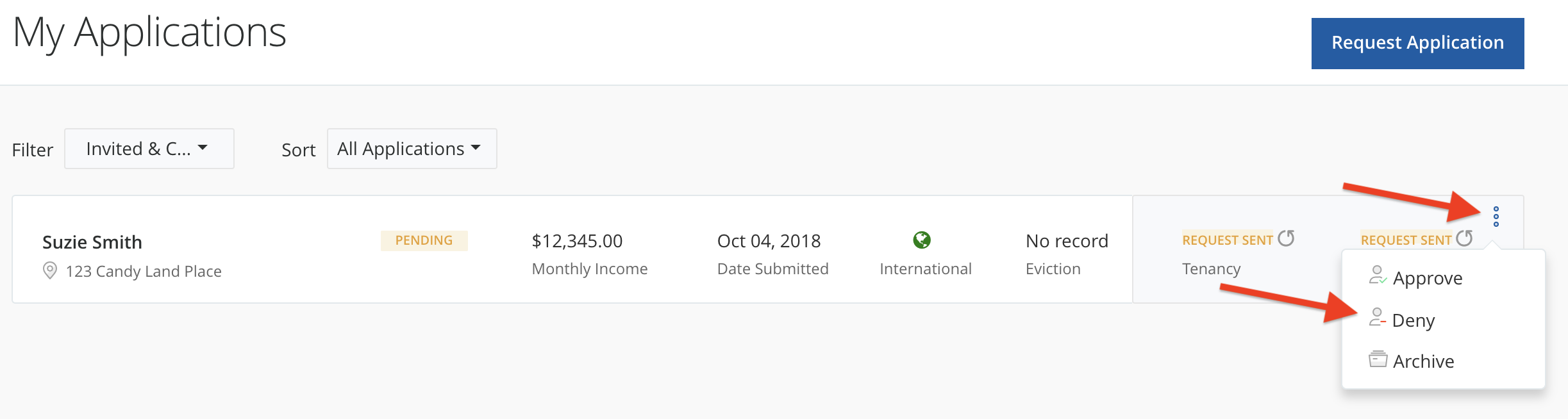
To find the Adverse Action letter, you will first need to update the status of your applicant to denied. You can do this from the My Applications page by clicking the options icon (...) by the applicant's name, then select Deny.
A modal will pop up allowing you to Notify the Applicant (optional), open a preview of the letter, or download the letter in Intellirent Messaging.
The adverse action letter will have the applicant's information pre-populated on the letter. You can review the Denial Letter by selecting, "Download Denial Letter", to open the file in a new window, and send at your convenience.
Moving applications to different folders does not notify the applicant. If you have accidentally moved an application, simply follow the same steps to move them back.
Intellirent never communicates approvals or denials to your applicants.
Still need help? Submit a support request here.